4

After installing LXDE to my Ubuntu 13.10 system, the notifications tooltip theme changed and it remains after uninstalling LXDE.
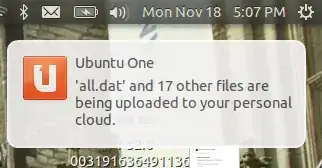
enter image description here

Also before that, pressing Fn + Arrow Keys in my laptop I could change the volume and brightness settings and a tooltip would show up indicating the current levels, but now that doesn't show anymore.

Braiam
  • 66,947
  • 30
  • 177
  • 264
Prastt
  • 291
  • 2
  • 14
  • Can you try changing the theme in System Settings -> Appearance? – Paul Tanzini Nov 29 '13 at 23:28
  • @Dash_plus_Java, yes I've done that but it doesn't work (the theme changes but no tooltip / wrong theme on tooltip). However, I have Ubuntu Tweak installed which also modifies the theme. I have tried changing the theme there but no luck – Prastt Nov 29 '13 at 23:31
  • Try installing dconf-tools (`sudo apt-get install dconf-tools`) and then running `dconf reset -f /org/compiz/` in terminal. – Paul Tanzini Nov 29 '13 at 23:35
  • For the second problem you should be able to use the [Keyboard Settings](http://i.stack.imgur.com/MDUaB.png) – Wilf Nov 29 '13 at 23:38
  • @Dash_plus_Java, that only reseted my desktop settings (# of desktops, auto-hide sidebar etc) but doesn't solve the problem. – Prastt Nov 29 '13 at 23:41
  • @wilf, the keyboard bindings for volume, brightness, etc. work. The problem is that the tooltip doesn't appear as before. – Prastt Nov 29 '13 at 23:43
  • You could try using the [Compiz Config Settings Manager (CCSM)](https://apps.ubuntu.com/cat/applications/compizconfig-settings-manager/) – Wilf Nov 29 '13 at 23:54
  • can you upload the content of the `/var/log/dpkg.log`? – Braiam Nov 29 '13 at 23:57
  • @avinashraj please, do not use backticks! [Formatting, backticks and editing](http://meta.askubuntu.com/q/7707) – Braiam Nov 30 '13 at 00:01
  • @wilf, I have it installed but I can't seem to find the right setting. Do you have any suggestion? – Prastt Nov 30 '13 at 00:08
  • It us just it may have a setting for it - *due to my stupidity I mucked up external hard disk case, so can't access my main Ubuntu install at the moment, therefore cannot verify a few answers...* From memory you can change the popup mini tool-tip things and the right-click menu from ccsm, so I thought it may have a setting for this... – Wilf Nov 30 '13 at 22:46

2 Answers2

7

Just remove xfce4-notifyd package and reinstall notify-osd if is not installed. Restart your desktop session.

sudo apt-get remove xfce4-notifyd && sudo apt-get install notify-osd
xangua
  • 7,178
  • 4
  • 26
  • 29
0

Use this software to change the notifications. It seems a little heavy handed, but reseting doesn't seem to be working for you.

How to customize on screen notifications?

Paul Tanzini
  • 3,807
  • 1
  • 11
  • 19
  • Weird. This didn't work either. When I change the configutation and hit apply, it still shows the same tooltip (and no tooltip on volume controls) – Prastt Nov 29 '13 at 23:59
  • Another thing that seems to fix this problem for others is purging the desktop that caused the issue. I'm not sure if it's possible, but try purging LXDE and see if that fixes it. – Paul Tanzini Nov 30 '13 at 00:02
  • I always uninstall with purge. In fact I even reinstalled ubuntu-desktop – Prastt Nov 30 '13 at 00:05
  • I would check out this post and see if you missed anything. It looks like removing the meta-package will leave behind a lot. [http://askubuntu.com/questions/86602/completely-remove-lxde-lubuntu-desktop-environment](http://askubuntu.com/questions/86602/completely-remove-lxde-lubuntu-desktop-environment) – Paul Tanzini Nov 30 '13 at 00:10
  • I got `The following packages have unmet dependencies: libm17n-0 : Depends: libgd3 (>= 2.1.0~alpha~) but it is not going to be installed ` – Prastt Nov 30 '13 at 00:20
  • What command gave you that output @Barefeg? – Paul Tanzini Nov 30 '13 at 00:25
  • The one from http://www.psychocats.net/ubuntu/pureubuntu for lubuntu – Prastt Nov 30 '13 at 00:25
  • Well it seems like the only thing it is installing is unity-desktop. It just may be something old or another. Did it work to fix the notifications? – Paul Tanzini Nov 30 '13 at 00:27
  • I installed (reinstalled) ubuntu-desktop in my previous attempt but it didn't fix anything. – Prastt Nov 30 '13 at 00:32
  • Well I noticed `xfce4-notifyd` in the list of stuff to be purged, and that is what seems to be causing issues for others. If you can try `sudo apt-get purge xfce4-notifyd` and restart that may be the end of it. – Paul Tanzini Nov 30 '13 at 00:34
  • Wow it finally worked. I don't know why it didn't purge it before. – Prastt Nov 30 '13 at 00:39
  • It looks like the command from that website uses `apt-get remove`. That could be why ;) – Paul Tanzini Nov 30 '13 at 00:40