4

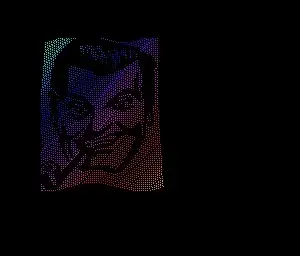
I have seen on older (ca. 2004) RHEL systems a screensaver, xlock, with a twisting and morphing picture of J. R. "Bob" Dobbs. An extensive search of screensavers available for Ubuntu has not provided revelation. Does any SubGenius out there know where I may find it for the current Lubuntu?

Where do I expect to find it? Well, every screensaver app available via Synaptic and Ubuntu Software Center has been checked, to no avail, including xscreensaver. I have also done an extensive search for it via multiple search engines, not merely looking at the first screen in a Google Search. That's why I am asking here.

How might I import that app from Slackware's repository into Lubuntu?

K7AAY
  • 16,864
  • 9
  • 45
  • 77
  • 1
    I suspect it is, or was, in `xscreensaver`. – chronitis Oct 24 '13 at 07:26
  • According to [this man page for the xscreensaver `flag` hack](http://old.easyco.com/easydocs/linux/man/man1/flag.htm), you can get this with the `-bitmap '(default)'` option. `sudo apt-get install xscreensaver` should be what you want. – poolie Oct 24 '13 at 09:01
  • Looks like you are right @poolie , http://www.jwz.org/xscreensaver/screenshots/retired/ although it was removed in later versions. – Mateo Nov 18 '13 at 23:38
  • All Hail Poolie! Would you put that in the form of an Answer so I may award you w/ a Chequemarque? – K7AAY Nov 18 '13 at 23:57

1 Answers1

2

Based on information from @poolie this screen saver used to be in xscreensaver, but is no longer. http://www.jwz.org/xscreensaver/screenshots/retired/ States that in version 5.08 the flag screen-saver was retired.

So to get it I dug up a old version and extracted it: http://ubuntuone.com/1VrIgyEQoBXJ6bR7JOly0O Download flag from my link or extract it from the .rpm for the old version.

Then install xscreensaver How can I change or install screensavers?

sudo apt-get install xscreensaver

Then in the same folder as you downloaded flag - navigate to it in terminal (you may need to mark it as executable):

./flag -bitmap "(default)"

This runs the screen-saver in a window:

bob

(note: might need to stop gnome-screensaver first, sudo killall gnome-screensaver)


Integrating with xsceensaver:

  1. Copy flag to /usr/lib/xscreensaver (may need sudo permission)
  2. run xscreensaver or xscreensaver-demo
  3. Select any existing screensaver go to → Settings... → In the command line change to flag -root

Settings

Mateo
  • 8,064
  • 9
  • 57
  • 78