17

Keyboard shortcut Ctrl+Alt+T opens a new terminal window on Linux. By default it opens 1 new terminal window.

Is there a way how to customize how many new tabs are going to be opened? E.g. by using this shortcut it will open 2 tabs by default.

What is the right keyboard shortcut to open a new tab in existing terminal ?

I want to have 2 tabs opened and switch between them with Ctrl+Page Up.

Radu Rădeanu
  • 166,822
  • 48
  • 327
  • 400

3 Answers3

39

Looking in the menu I can see that the shortcut to open a new tab is CTRL+SHIFT+T

chesedo
  • 1,689
  • 14
  • 25
18

Once you have Terminal open you can use Shift+Ctrl+T, and that will open another tab. see image below. Once you do that you can use Ctrl+Page Up to switch.

enter image description here

Mitch
  • 106,657
  • 24
  • 210
  • 268
10

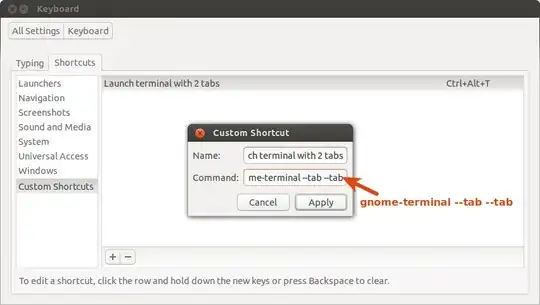
If you want to open gnome-terminal with more than one tab when you open it using Ctrl+Alt+T shortcut, go to System SettingsKeyboardShortcutsCustom Shortcuts and add a new Ctrl+Alt+T shortcut as follow:

custom shortcut

Select Reassign when you are asked:

enter image description here

Now, to open a new tab in gnome-terminal, you can use Ctrl+Shift+T. To access/view/edit your terminal shortcuts go to EditKeyboard Shortcuts...:

terminal Keyboard Shortcuts

Radu Rădeanu
  • 166,822
  • 48
  • 327
  • 400
  • what kind of ubuntu are you using? I am using 12.10...trying to follow your steps, but stacked at **select reasign**.When I create a custom shortcut according to screen 1, it does not asks me for keyboard shortcuts ( e.g. CTRL+Alt+T), instead it is disabled.. –  Oct 12 '13 at 10:48
  • @maro Just click with your muouse where is written `Ctrl+Alt+T` (where you say that is written `Disabled`) in [this image](http://i.stack.imgur.com/tvFB5.png). Afer click it will say `New accelerator...` - now type your shortcut (this keys: `Ctrl+Alt+T`). – Radu Rădeanu Oct 12 '13 at 10:57