13

What is the terminal command to turn Airplane Mode on/off in Ubuntu?

Is it simply sudo rfkill block all and sudo rfkill unblock all? I know that this will disable all wireless modules in the computer, but will this be noticed by the system, so that Airplane Mode is toggled off/on in network settings?

lindhe
  • 682
  • 3
  • 10
  • 25

5 Answers5

10

Running the following command in terminal:

gnome-control-center network

will open a window for network management which should be similar with:
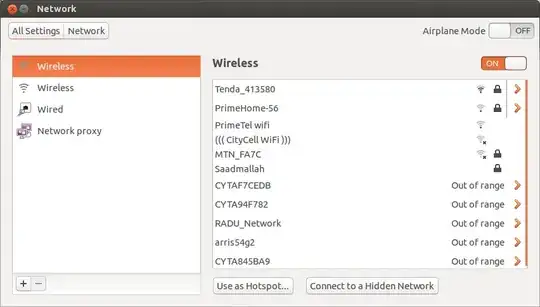
Airplane mode on

You can observe that at this moment the "Airplane Mode" is off and the wireless is on.

Now, without to close this window, run the following command in terminal:

nmcli nm wifi off

The above window will be changed automatically to:

Airplane mode on

As you can see, now "Airplane Mode" is on and the wireless is off.

Running, again in terminal, the following command:

nmcli nm wifi off

will turn "Airplane Mode" off and wireless on again.

So, you don't need rfkill (which need also root privileges) to toggle "Airplane Mode" via terminal.

nmcli (see also man nmcli) it's enough and can be executed by any usual user... You don't need root privileges to climb in an airplane :)).

Radu Rădeanu
  • 166,822
  • 48
  • 327
  • 400
  • 1
    `nmcli nm wifi off` does not turn off airplane mode unless bluetooth is off. – kzh Dec 28 '14 at 17:27
  • 1
    For 15.04 it would be: `nmcli r all off` and `nmcli r all on`. Or to include bluetooth: `rfkill block bluetooth & rfkill block wlan` and `rfkill unblock bluetooth & rfkill unblock wlan` . – VRR Jul 26 '15 at 12:42
  • For 15.04 (with updates) I found this to work best: alias wifitoggle='nmcli r wifi off ; sleep 1 ; nmcli r wifi on' – Alan Thompson Oct 20 '15 at 23:51
  • Thank you! I was having the same problem. Turns out my laptop was in "flight" mode, but the light indicator wasn't lit... – Salim Ibrohimi Oct 15 '19 at 08:48
4

For Ubuntu 18.04:

nmcli r wifi on turns airplane mode off, and the converse sets it on.

A simple bash script to toggle airplane mode on or off is below; save it to file and set its execute bit in properties.

#!/bin/bash
wifi="$(nmcli r wifi | awk 'FNR = 2 {print $1}')"
if [ "$wifi" == "enabled" ] 
then
    nmcli r wifi off
else
    nmcli r wifi on
fi
  • The script has 3 errors. First you do not need to test FNR==2 because the script returns only one line (no headers). Second if you want to test FNR, then you have to write FNR == 2. Third the backquote on the line testing the variable wifi has to disappear. – Rudy Vissers Oct 24 '20 at 14:00
  • @RudyVissers, thnaks for catching the errors inserted when a third party "edited" this answer. As for the script *working*, it is currently functioning on a PC with Ubuntu 18,04 in the *original* format, which I've reinstated. – DrMoishe Pippik Oct 25 '20 at 01:21
  • It is working because `nmcli r wifi` does not return a header and `FNR = 2` has no effect. You can remove `FNR = 2` and your script will continue to work. – Rudy Vissers Oct 26 '20 at 06:06
2

Tested on 20.04.1 LTS. Let's disable all radio transmissions:

rudy@nbu130-rudy:~/bin$ pwd
/home/rudy/bin

rudy@nbu130-rudy:~/bin$ ./airplane_toggle 

rudy@nbu130-rudy:~/bin$ nmcli radio all 
WIFI-HW  WIFI     WWAN-HW  WWAN    
enabled  enabled  enabled  enabled 

rudy@nbu130-rudy:~/bin$ ./airplane_toggle 

rudy@nbu130-rudy:~/bin$ nmcli radio all 
WIFI-HW  WIFI      WWAN-HW  WWAN     
enabled  disabled  enabled  disabled 

rudy@nbu130-rudy:~/bin$ cat airplane_toggle 
#!/bin/bash
radio="$(nmcli radio all | awk 'FNR == 2 {print $2}')"
if [ "$radio" == "enabled" ]
 then
  nmcli radio all off
else
 nmcli radio all on
fi

It is even possible to assign the command '/home/rudy/bin/airplane_toggle' to a shortcut (tested).

Rudy Vissers
  • 446
  • 7
  • 20
2

By combining answers in different threads, I got it working on Ubuntu 20.04

@Rudy's above and this: https://askubuntu.com/a/1144599/806813

#!/bin/bash

radio="$(nmcli radio all | awk 'FNR == 2 {print $2}')"

if [ "$radio" = "enabled" ]
 then
    nmcli radio all off
else
    nmcli radio all on
fi

if rfkill list bluetooth | grep -q 'yes$' ; then
    rfkill unblock bluetooth
else
    rfkill block bluetooth
fi

Assigned to Alt-A for me but that is personal choice.

Mind you I already have the built in WiFi adapter on my Lenovo T420 disabled because I am using an Asus USB Wifi adapter which this toggles on and off along with the Bluetooth.

mLstudent33
  • 655
  • 1
  • 6
  • 29
1

On Debian- and Arch-based distros, inspired by the previous code, this will disable WiFi and Bluetooth and send a notification:

#!/bin/bash
wifi="$(nmcli r wifi | awk 'FNR = 2 {print $1}')"
if [ "$wifi" == "enabled" ]; then
    rfkill block all &
    notify-send 'Mode avion: actif'
else
    rfkill unblock all &
    notify-send 'Mode avion: inactif'
fi
BeastOfCaerbannog
  • 12,964
  • 10
  • 49
  • 77
BenTGNU
  • 11
  • 1