2

I was getting No space left on device, so I removed some of the files. But again when I try to update my folder with svn update I am getting the same error. Is this the problem with space left?

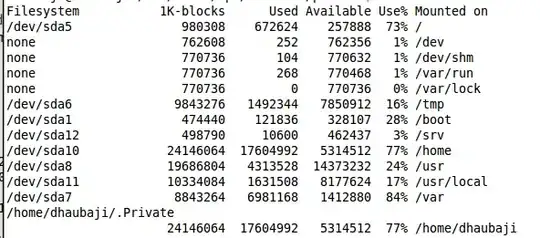
When I run df -k I get

enter image description here

and when I run df -i , I get

enter image description here

It seems like the system has ran out of inode space as you suggested even though I have the space left in my disk. How do I fix this?

Whisperity
  • 424
  • 1
  • 6
  • 16
Prabesh Shrestha
  • 1,075
  • 2
  • 11
  • 11

2 Answers2

10

Check what's the disk usage with

df -k

and

df -i

The first command will tell you how much diskspace (in terms of kilobytes) is available and the second one will do the counting for inodes . If you have a huge number of small files the partition may have still free diskspace, but run out of inodes (which if you don't know about them, you can see like 'slots' in a parking space)

Ok, so if you effectively are running out of inodes, the only way to fix it is to reformat the partition using different parameters. If you cannot do that, you can try to mitigate the problem by moving part of the 'inode-hungry' section of data to a different partition. Starting from /home top level, you can run this simple script (apologies if it's not 100% fool-proof ;-) )

for dir in *; do [ -d "$dir" ] && echo "$dir" && find "$dir" | wc -l; done

It should count for each subdirectory how many inodes are used (in short, each file or directory present). You can repeat the procedure going down a few levels if you want. Anyway, once you identify the directory that consumes most of the inodes, you can move it to somewhere else, and leave inside /home a symlink to the new location.

Shorter that that, your only chance is to archive (with tar, zip or similar tools) the part of data in /home directory that you are not currently using (and remove the loose files). This will bring the inodes count down, but at the cost of continuously archiving/unarchiving pieces of the storage.
bitwelder
  • 376
  • 2
  • 8
  • Thanks for the suggestions. I did check with df -k and df -i . I have uploaded the outputs I am getting from these commands. It seems like the system has ran out of inodes as you suggested evenif I have the space left in my disk.How do I fix this ? – Prabesh Shrestha Mar 27 '11 at 09:47
  • 1
    @Prabesh: See [Linux - Help, I'm running out of inodes!](http://serverfault.com/q/111857/51929). – Lekensteyn Mar 27 '11 at 10:15
  • @Lekensteyn formating my partition to use different file system will be a little difficult for me , since I will have to configure all my applications again. But I will be doing that if I don't find the solution. Thanks – Prabesh Shrestha Mar 27 '11 at 10:27
  • 1
    Edited my answer with some possible workarounds (there isn't other solution other than reformatting/extending the partition) – bitwelder Mar 27 '11 at 15:00
5

I always start with the effortless "apt-get clean" to remove downloaded package files when I need more disk space.

Byte Commander
  • 105,631
  • 46
  • 284
  • 425
Jonathan Ross
  • 251
  • 1
  • 3