0

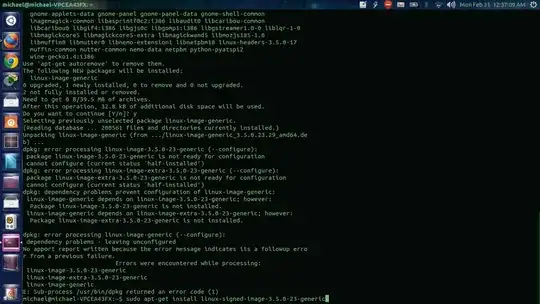
enter image description hereenter image description hereAnytime I install something or update Ubuntu, I notice this during the ending process in the terminal:

linux-image-3.5.0-23-generic
linux-image-extra-3.5.0-23-generic
linux-image-generic
E: Sub-process /usr/bin/dpkg returned an error code (1). 

Is there a fix for this?

Michael Scott
  • 2,571
  • 4
  • 21
  • 25

2 Answers2

0

Purging those kernel packages and their configuration files, then re-installing them may solve the issue. In terminal:

sudo apt-get purge linux-image-3.5.0-23-generic linux-image-extra-3.5.0-23-generic linux-image-generic && sudo apt-get install linux-image-3.5.0-23-generic linux-image-extra-3.5.0-23-generic linux-image-generic

ananaso
  • 3,890
  • 4
  • 30
  • 50
  • Still No change. Now I get a red alert icon in the taskbar in the upper right corner of my screen. If I can't find a solution, I'm going back to 12.04.I uploaded a photo above to show the results of my attempt. – Michael Scott Feb 11 '13 at 05:41
  • @MichaelScott try running `sudo apt-get -f install` or `sudo dpkg --configure --pending` ([source](http://www.linuxquestions.org/questions/debian-26/sub-process-usr-bin-dpkg-returned-an-error-code-1-a-171107/#post3753885)) – ananaso Feb 28 '13 at 21:46
  • Also, I would suggest checking out [this question](http://askubuntu.com/questions/195950/package-system-broken-e-sub-process-usr-bin-dpkg-returned-an-error-code-1). – ananaso Feb 28 '13 at 21:56
0

I was having a similar problem on a VirtualBox and the problem was I didn't have PAE enabled.

M Smith
  • 101
  • 1