4

I think the title is self-explanatory but let me add more info:

Ubuntu 12.10 64bit

When I delete a file and then use graphical file manager (nautilus, nemo, etc...) the file does not appear to exist, which is what I expect when deleting a file. However, when I use terminal and look at files (using "ls" or "la" command) I can see the deleted files with "~" added after their names. For instance, a file named "Test.txt" will have a copy named "Test.txt~" after deletion.

Is this a bug? Why don't those files get deleted even after some time?

devav2
  • 35,738
  • 17
  • 79
  • 82
Ba7a7chy
  • 529
  • 2
  • 5
  • 15
  • 1
    Take a look at [this post](http://askubuntu.com/questions/83026/prevent-gedit-from-creating-files-with-the-tilde-suffix). These are backup files automatically created by your text editor (gedit). – Glutanimate Dec 26 '12 at 14:27
  • I think this is the solution, maybe you can write an Answer so I can accept it ? – Ba7a7chy Dec 26 '12 at 14:36
  • Flimm provided a pretty good answer. Go ahead and accept it, I won't mind :). – Glutanimate Dec 26 '12 at 14:40

1 Answers1

4

In Linux, files beginning with a dot are hidden files. A lot of commands (like ls) will not display these by default. In addition, Nautilus also hides files that end with a ~. These files generally are backup files created by text editors like Gedit.

If you want to delete these files in Nautilus, you need to view the hidden files first by pressing Ctrl+H or by clicking View, Show Hidden Files.

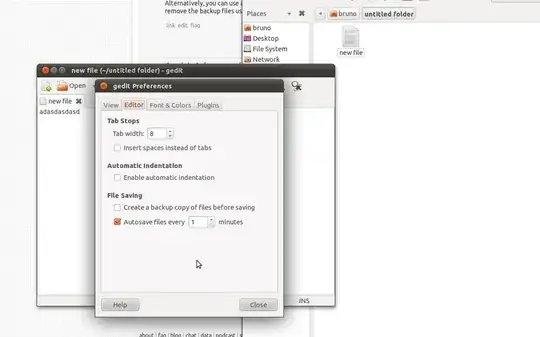
To permanently prevent gedit from creating backup files head to Edit --> Preferences --> Editor and remove the checkmark in front of Create a backup copy of file before saving:

enter image description here

Note: Please consider that backup files can be quite handy at times, so disabling them might not be the best idea.

Eric Carvalho
  • 53,609
  • 102
  • 137
  • 162
Flimm
  • 40,306
  • 22
  • 94
  • 154