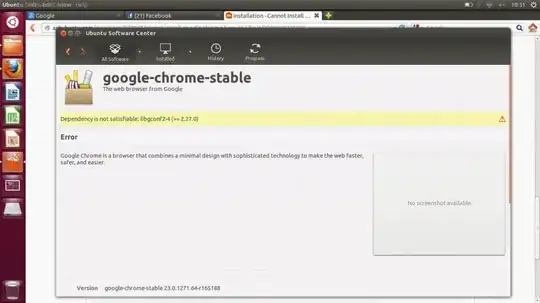
I can't install Google Chrome browser. I wonder why and how to fix it. Here is the log I got from my terminal when installing Google Chrome.
$ sudo dpkg --install chrome.deb
[sudo] password for young:
Selecting previously unselected package google-chrome-stable.
(Reading database ... 141861 files and directories currently installed.)
Unpacking google-chrome-stable (from chrome.deb) ...
dpkg: dependency problems prevent configuration of google-chrome-stable:
 google-chrome-stable depends on libgconf2-4 (>= 2.27.0); however:
  Package libgconf2-4 is not installed.
 google-chrome-stable depends on libnss3-1d (>= 3.12.3); however:
  Package libnss3-1d is not installed.
 google-chrome-stable depends on libxss1; however:
  Package libxss1 is not installed.

dpkg: error processing google-chrome-stable (--install):
 dependency problems - leaving unconfigured
Processing triggers for desktop-file-utils ...
Processing triggers for bamfdaemon ...
Rebuilding /usr/share/applications/bamf.index...
Processing triggers for gnome-menus ...
Processing triggers for man-db ...
Errors were encountered while processing:
 google-chrome-stable

$ sudo apt-get install -f
Reading package lists... Done
Building dependency tree
Reading state information... Done
Correcting dependencies... Done
The following package was automatically installed and is no longer required:
  linux-headers-3.5.0-17
Use 'apt-get autoremove' to remove it.
The following packages will be REMOVED:
  google-chrome-stable
0 upgraded, 0 newly installed, 1 to remove and 0 not upgraded.
1 not fully installed or removed.
After this operation, 140 MB disk space will be freed.
Do you want to continue [Y/n]? Y
(Reading database ... 141960 files and directories currently installed.)
Removing google-chrome-stable ...
Processing triggers for man-db ...
Processing triggers for desktop-file-utils ...
Processing triggers for bamfdaemon ...
Rebuilding /usr/share/applications/bamf.index...
Processing triggers for gnome-menus ...

$ sudo dpkg --install chrome.deb
Selecting previously unselected package google-chrome-stable.
(Reading database ... 141861 files and directories currently installed.)
Unpacking google-chrome-stable (from chrome.deb) ...
dpkg: dependency problems prevent configuration of google-chrome-stable:
 google-chrome-stable depends on libgconf2-4 (>= 2.27.0); however:
  Package libgconf2-4 is not installed.
 google-chrome-stable depends on libnss3-1d (>= 3.12.3); however:
  Package libnss3-1d is not installed.
 google-chrome-stable depends on libxss1; however:
  Package libxss1 is not installed.

dpkg: error processing google-chrome-stable (--install):
 dependency problems - leaving unconfigured
Processing triggers for desktop-file-utils ...
Processing triggers for bamfdaemon ...
Rebuilding /usr/share/applications/bamf.index...
Processing triggers for gnome-menus ...
Processing triggers for man-db ...
Errors were encountered while processing:
 google-chrome-stable
It does not work in GUI too. Look at what I have got: