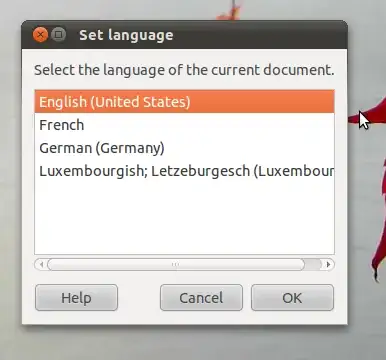
8

I use spell-checker for 4 languages, en, de, fr, and lb.

If I enable Spellchecking and writing aids for en, de or fr in System -> Administration -> Language Support there will be multiple versions of each language available, e.g. en , en_CA, en_GB, ...
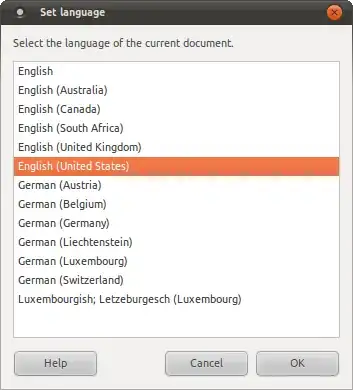
alt text

Is there a possibility to select only one of those language versions while enabling the language, or removing the others afterwards. It would be enough to remove them from the selection menu.

I would like to use the version which is equal to the country the language originally comes from: e.g. de_DE, fr_FR, en_GB. For lb there is currently only lb_LU so there is no problem (yet).

Instead of 4 languages I currently have around 20, which is kind of annoying when switching the language ( which I do quite often).

There might be a similar problem for the menu translations, where if I understand correctly you can choose the order in which translations are applied if they exist.

Any suggestions?

Jorge Castro
  • 70,934
  • 124
  • 466
  • 653
Pit
  • 1,214
  • 2
  • 13
  • 26

1 Answers1

2

What worked for me, is de-installing the aspell dictionary, because it contains all four English versions in one package, and then installing/de-installing the localized dictionary’s for hunspell. so you can choose to only install the en_EN but leave en_CA uninstalled . And because Synaptic gave me no dependency warning when de-installing aspell plus its dictionaries it should still work in all programs.

[edit] only works for english. french, and german are also all-in-one packages for myspell/hunspell

[edit2] what now really works, but may not be the best solution:

delete de dictionaries/links to dictionaries from /usr/share/myspell & /usr/share/hunspell after de-installing aspell. Only flaw may be that hunspell only has an en_US dictionary, but no british version

enter image description here

Isaiah
  • 58,486
  • 28
  • 133
  • 145
JerryP
  • 52
  • 2
  • I confirm that deleting `aspell-en` does not warn for dependencies, but ff I search for `hunspell` in synaptic I only see `hunspell-en-ca` and `hunspell-en-us`. Where are Australia, South Africa and United Kingdom? I don't really want to delete directories manually. But will try if the first solution works for English. – Pit Jan 19 '11 at 07:27
  • It seems to work. There are still some issue: French being twice in the list, German (Luxembourg) as well as English (United States) still being there. But I should be able to figure that one out too. http://i.imgur.com/cZt2N.png – Pit Jan 20 '11 at 22:48
  • deleting dictionaries/links to dictionaries from `/usr/share/myspell` & `/usr/share/hunspell` did the trick for me. i could otherwise not remove the many flavors versions of the french and spanish dictionaries. – Nicolas Feb 12 '20 at 10:08