5

Here's me in gnome-terminal, using telnet.
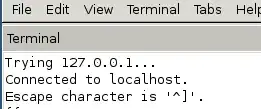
enter image description here

As it says "Escape character is '^]'

I've no idea which keys to hit, CTRL ] , CTRL Å , CTRL ^ does nothing.

This is the keyboard layout of Norwegian keyboards - which keys do I hit to get to the telnet escape prompt ?

enter image description here

nos
  • 1,203
  • 3
  • 14
  • 17
  • 2
    Given your keyboard layout, CtrlAltGr9 should work, doesn't it? – January Sep 12 '12 at 02:41
  • 1
    That's CTRL ] , so yes it should. It doesn't. CTRL AltGr 9 Enter does work in Fedora and RHEL though – nos Sep 12 '12 at 07:08
  • @nos: I've been using CtrlAltGr9 from a Danish keyboard in gnome-terminal for years and its been working. Now I'm stuck in Windows, where it _doesn't_ work. – Peter V. Mørch Jul 13 '20 at 14:39

3 Answers3

3

You can set up the escape character you want by passing the option -e " your escapechar"

-e escapechar -Sets the escape character to escapechar. If no character is supplied, no escape character will be used. Entering the escape character while connected causes telnet to drop to command mode.

LnxSlck
  • 12,146
  • 1
  • 41
  • 51
  • 1
    As mentioned CTRL Å doesn't work (upper case nor lower case) – nos Sep 12 '12 at 00:11
  • What LnxSlck just wrote means that you can start telnet with an option specifying just any kind of escape character. – January Sep 12 '12 at 02:43
1

Using the command showkey -a you can check which character sequence a terminal application receives. You can try different key combinations until you find one showing ^] 29 0035 0x1d.

~$ showkey -a

Press any keys - Ctrl-D will terminate this program

^]       29 0035 0x1d
^D        4 0004 0x04

Note: In my case I was looking for a combination for the Czech QWERTY keyboard layout with Windows Terminal. The working one is Ctrl+ů. The key ů is ; in the US layout. The combinations Ctrl+AltGr+... do not work at all in Windows Terminal but they work in Mintty / WSLtty.

0

Gnome Terminal does not pass the escape sequence to the telnet session. The only way is setting a different escape char when starting telnet, or using a different terminal emulation other than the gnome terminal.

cros
  • 1
  • 2
    This is not good answer. Provide proof links please. Also explain how to set different escape character. – c0rp Apr 07 '14 at 10:03