I want to learn C language . and i would like to know how I can practice it using Ubuntu 12.04
Is there any platform for it and if so how can I get it? Or can I learn it using the terminal?
I want to learn C language . and i would like to know how I can practice it using Ubuntu 12.04
Is there any platform for it and if so how can I get it? Or can I learn it using the terminal?
NOTE : Refer Online resources for C learning tutorials , i am only linking the Tools and Platform available In Ubuntu ,needed for you to begin with C.
To use C and C++ you will need to install the build-essential package.
sudo apt-get install build-essential
You can now compile C and C++ programs with GCC and g++ .
Where GCC stands for “GNU Compiler Collection”. GCC is an integrated distribution of compilers for several major programming languages. These languages currently include C, C++, Objective-C, Objective-C++, Java, Fortran, Ada, and Go.
You will find available Official Programming tools here and for Power Users Programming
To help you begin from Ground-Zero refer here for typing your Fisrt C program and how to compile it and another Example Tutorial using GCC.
To begin with : What you will basically need is an Editor from above , ( try Gedit as beginner, there are many to choose from) for compiling through Command Line
Or
Directly use IDE ( Integrated Development Environment) such as Geany ,Anjuta or Code::Blocks IDE.
Example Using text editor
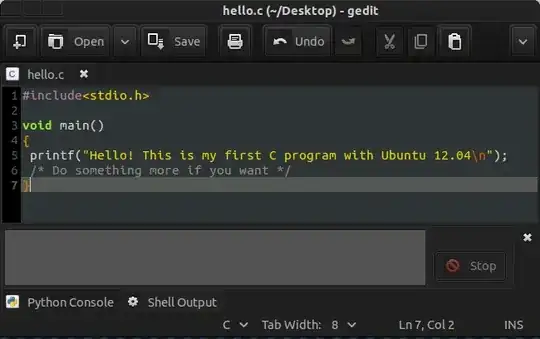
Then in terminal
gcc hello.c -o hello1

./hello1
which will give O/P like
user@host:~/Desktop$ ./hello1
Hello! This is my first C program with Ubuntu 12.04

If you want to use and practice only C, then you can use the default gcc compiler (which is installed by default as C compiler on almost every Linux distribution) . From your question, I suppose you also wanted to use this in terminal. Here I give a simple example of a C program using terminal.
Open a terminal and type nano hello.c and Press Enter.
An editor will be opened in terminal. This is nano. Type the following to create a simple C program
#include <stdio.h>

int main(){

    printf("Hello C, I am in Ubuntu\n");
    return 0;
}
CTRL+O to write to the file. Then press CTRL + W to exit nano.gcc -o hello hello.c. It will compile the hello.c file and create an executable with name hello../hello to see the output of the program.Note: The details explanation of the program is beyond the scope of the answer.
You can check these link to learn more about gcc compiler and using C in Ubuntu.


