6

Not sure where to start with this one.

I've installed Gnome 3 by running sudo apt-get install gnome on my netbook, it all installed fine and ran fine didn't have any issues with it for a few weeks, then I turned on my netbook and logged in to be given the look and feel of Gnome 2.

I've cropped down the desktop in the image below.
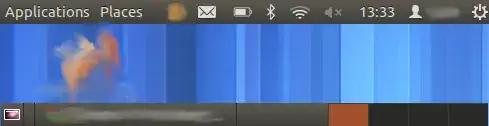
Gnome 3 Desktop

Edit: Pastebinit as requested by izx
kern.log

dmesg

sudo lshw

Nalum
  • 1,371
  • 1
  • 12
  • 14
  • may be your nvidia card driver have set to turn the composite extension off so that it can work fine. –  Jan 02 '13 at 07:24
  • @Amod The reason this was happening to me is because the nVidia drivers were installed but there is no nVidia card in the system. http://askubuntu.com/questions/158297/why-has-gnome-3-reverted-to-classic-gnome-2-look-and-feel#comment192562_158307 – Nalum Jan 04 '13 at 11:24

1 Answers1

12

Let's try the simple way to fix it first, because that looks like the Gnome3 Classic look (which is, yes, very similar to Gnome2)

  1. Open a terminal, and type/paste:

     sudo apt-get update && sudo apt-get --reinstall install gnome-shell
    
  2. Logout

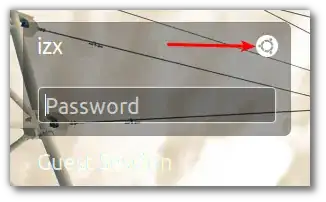
  3. Click on the Ubuntu logo:

    enter image description here

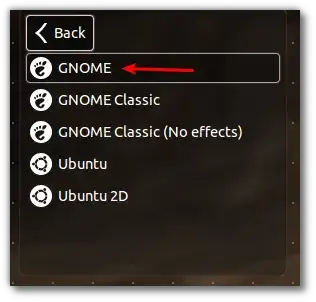
  4. Select the Gnome session, and click back:

    enter image description here

  5. Login and see if you still get the Gnome2 look-and-feel.

ish
  • 138,666
  • 36
  • 303
  • 312
  • Thanks for the answer, I have done this and it didn't fix the issue. When I log in now I am still getting the Gnome3 Classic look and now my resolution is locked at 640x480. – Nalum Jul 01 '12 at 13:41
  • 1
    You are falling back to 2D because your 3D is disabled, possibly because your graphics drivers are broken. Please share the content or output of the following commands/files to better help us troubleshoot your problem [(*instructions in this answer*)](http://askubuntu.com/q/152371/58612): file(s): `/var/log/kern.log`, command(s): `dmesg`, `sudo lshw` – ish Jul 01 '12 at 13:44
  • I've added the pastebinit links to the question. – Nalum Jul 01 '12 at 15:37
  • @Nalum, why is the nvidia driver being loaded although you have no nvidia card? (see `dmesg` lines 919-921) – ish Jul 01 '12 at 16:24
  • no idea why that is there. so if I uninstall that it should hopefully fix the issue? – Nalum Jul 01 '12 at 18:31
  • Ran `sudo apt-get remove nvidia*` and then followed the steps in this http://askubuntu.com/questions/68306/how-do-i-restore-default-video-drivers. Thanks for your help izx – Nalum Jul 01 '12 at 20:02
  • @Nalum, very happy to know you solved your problem! Thanks for the link, I will add an edit to the answer about your particular situation and include it. – ish Jul 02 '12 at 12:34