7

I have just worked out how to create an animated.gif in gimp but I am having a problem adding text.

When I create/add the text box and then save my.gif and view it, the text only flashes up over one frame/layer.

How do I make the text last over the entire duration of the animated.gif?

If you could explain in very simple terms, with the easiest solution, that would be wonderful as I am quite new to all this and very unsure of what I am doing!

Thank you for any help you can give.

Mahdi
  • 566
  • 4
  • 15
Carla
  • 113
  • 1
  • 1
  • 5

1 Answers1

6

So, to make an Animated Gif you have to make layers and give them duration with renaming them and adding seconds like this : Layer 1(100s)

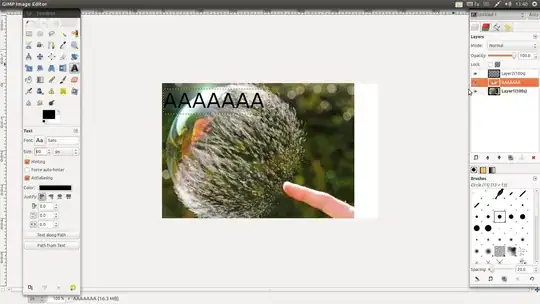
Are you sure you've added the Text to all layers already? I mean when you add a text, that will be on a single layer and you should Merge it with Layers like this :

1.You add text. Step One 2.Right click on text's layer ~> Merge Down so it merges Text Layer with the layer that's at bottom of this.
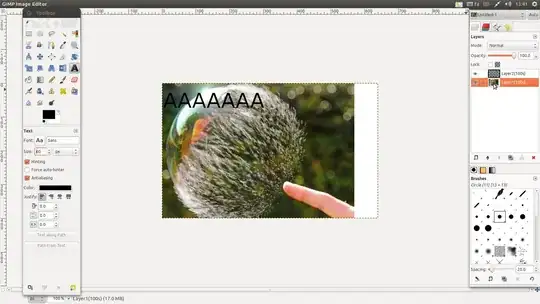
3.Now you have one layer with text. enter image description here

You should Merge your text with all layers to have it for the whole duration.

Also, for Script-fu Effects similar to outerglow, you should do this too, or to do this easier, when you're making effect, check up "Merge With Layer" and it's done!

Hope it helps.

Mahdi
  • 566
  • 4
  • 15
  • Thank you so much.. that helped but... when I merged the text to the first layer the text box disappeared? What did I do wrong? Thank you – Carla May 28 '12 at 09:25
  • 1
    You didn't anything wrong, Just Before you merge the text, copy it as much as you need, so you can merge the same text with same size and position to all layers, Regards. – Mahdi May 28 '12 at 09:30
  • It worked! That is fantastic! Thank you thank you sooo much. Have been struggling to teach myself how to create animated.gifs all day! Has been quite a long, arduous and frustrating task. Thank you so much! – Carla May 28 '12 at 09:41
  • Then Mark The Answer as correct answer ^^, Glad I could help. – Mahdi May 28 '12 at 09:46
  • I think I marked it correctly... the 'tick' yeah? Do I give you votes or anything... or is that what the 'tick' is for? Sorry, am new here. – Carla May 28 '12 at 09:48
  • Actually, one more thing... How do I increase the time between layers? Sorry, thank you – Carla May 28 '12 at 09:57
  • Oh I worked it out. Right click on the layer and then click 'edit layer attributes' (to get layer box to pop up "ctrl + l") – Carla May 28 '12 at 10:28
  • I think some of us expect to see this animated GIF on Imgur in the near future. – Ed Manet Mar 13 '13 at 20:36