19

In 10.10, I remember I had CPU Frequency Scaling Monitor by default. Now in 12.04, I cannot find anything similar in Ubuntu software center. I wonder what applications are recommended for scaling CPU frequency in 12.04, and how to get and install them?

Thanks and regards!

Braiam
  • 66,947
  • 30
  • 177
  • 264
Tim
  • 24,657
  • 62
  • 151
  • 245
  • 1
    Possible duplicate http://askubuntu.com/questions/35238/cpu-frequency-scaling-in-unity There is a package Tim in Launchpad =) – wojox May 27 '12 at 00:51
  • Does look like a dup. – John S Gruber May 27 '12 at 00:54
  • @wojox: why can't I find cpufreq in Ubuntu software center? Is there something similar to synaptic software manager in 12.04? – Tim May 27 '12 at 00:56
  • Here Tim http://askubuntu.com/questions/30334/what-application-indicators-are-available/37997#37997 – wojox May 27 '12 at 00:57
  • @wojox: You mean "ppa:artfwo/ppa"? How shall I use this information to get cpufreq? – Tim May 27 '12 at 00:59

4 Answers4

20

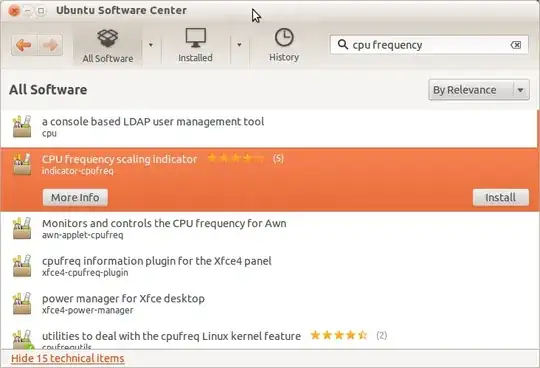
indicator-cpufreq can be found in the Software Center by searching "cpu frequency" and then clicking on the "show technical items" option:

enter image description here

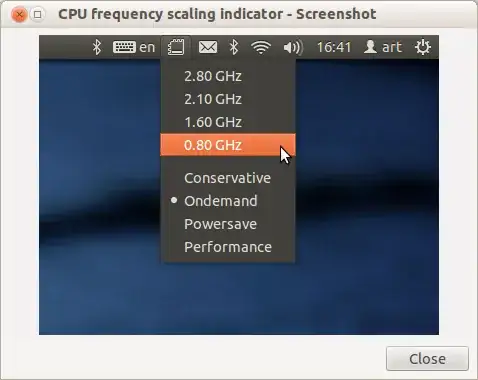
And this is what it looks like, to compare what you were used to in 10.04:

enter image description here

  • Note that you may need to put it in startup if you don't wish to start it manually every time -- usually it should go into Startup Applications automatically, like this:

enter image description here

ish
  • 138,666
  • 36
  • 303
  • 312
  • Thanks! I found and installed it. My laptop has two cores. indicator-cpufreq seems just give options for one core, or the options are for both cores? In 10.10, I have two identical groups of choices, each group for each core. – Tim May 27 '12 at 01:58
  • I believe the options are for both cores, i.e. it will set both cores at the same time to the same parameters. You would need to use `cpufrequtils` from the terminal if you want finer per-core control. – ish May 27 '12 at 02:00
  • I wonder if it is possible to show real-time CPU frequency? In 10.10, the CPU frequency monitor can both show it and scale it. – Tim May 27 '12 at 11:59
  • I also found that after restart, the setting of CPU frequency is back to "on demand". Can I set it once until I change it by myself? – Tim May 28 '12 at 22:57
  • Are there any command line options? – adazem009 Jun 06 '20 at 19:17
4

I use indicator-cpufreq on Unity. It seems very parallel to what I use with 10.10. You can install it using

sudo apt-get install indicator-cpufreq
Zanna
  • 69,223
  • 56
  • 216
  • 327
John S Gruber
  • 13,248
  • 3
  • 37
  • 64
2

I did a little bit of research and found this thread on Ubuntu Forums that explains how to use cpulimit to set the maximum consumption for a particular process. It runs as a daemon that will monitor all processes.

Zanna
  • 69,223
  • 56
  • 216
  • 327
2

This what I use to set the frequency of CPU in Ubuntu 12.04.

If you want to have control of CPU frequency in Ubuntu 12.04, do this:

  • open Ubuntu software center or synaptic software manager
  • Install awn-settings (this is a dock)
  • Now open awn settings and set to start-awn automatically
  • Restart computer
  • Now you must have the dock on the bottom of desktop
    • Right click Dock preferences
    • Go on to Applets tab.
    • In the Categories section select Monitor and from right section Available Applets double click on CPU Frequency monitor to add on dock.
jokerdino
  • 41,000
  • 24
  • 132
  • 201
octavian
  • 21
  • 1