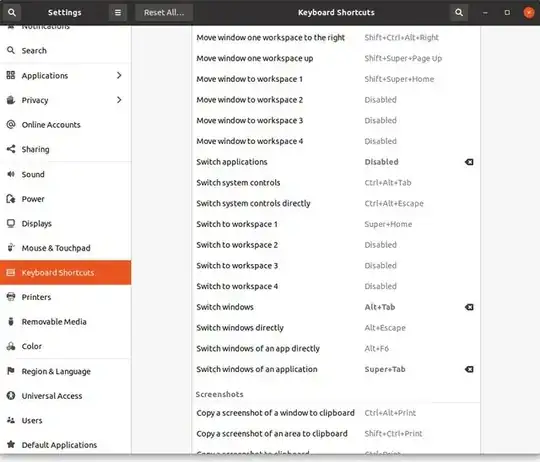
I tried on Ubuntu (Budgie) 20.04 with the same result, be it that the shortcut, if it worked, switched (only) between the two most recent windows of the active application. Like you, with a.o. Chrome, no switching took place at all.
We can think of several reasons why specific applications do not switch windows, but we'd need to look into the code to know what is exactly happening. Even then, it would not quite fix your issue.
The script below, run as a daemon, in combination with an edited shortcut, does the job though. It's tested on 20.04 and (at least) with Chrome with no issue. I am pretty sure it works fine with all applications with windows of type NORMAL.
What it does
The daemon is triggered by a trigger file, created in /tmp by a/the shortcut. Subsequently it looks up all valid windows of the active application, on the current workspace, in stack, so we know the z-order. The daemon then activates the first window in stack, thus cycling through the windows.
As an extra
...You can set a shortcut to switch between the two most recent application windows, which was the default behavior on my 20.04.
How to setup
- Copy the script below into an empty file, save it as
cycle_alternative, (or any other name you like). The extension .py is not needed.
- Make the script executable
- Run it (keep it running) by the command
/path/to/cycle_alternative.
- Now make your shortcut execute the command
touch /tmp/forward_trigger to make it cycle through all windows of the active application. To switch between the two most recent windows, set the shortcut to execute touch /tmp/switchactive_trigger
If all works fine, add the daemon to your startup applications.
Why a daemon?
You could add the same functionality to a script, called by a shortcut, but the cold start + loading the libs per occasion would make it work less responsive. Running the daemon is nothing when it comes to additional burden.
The script/daemon
#!/usr/bin/env python3
import gi
gi.require_version('Wnck', '3.0')
gi.require_version('Gtk', '3.0')
from gi.repository import Wnck, Gtk, Gio, Gdk, GdkX11
import os

class watchout:
    def __init__(self):
        self.wnckscr = Wnck.Screen.get_default()
        # we'll activate the daemon's function by trigger files
        self.triggers = [
            "/tmp/forward_trigger",
            "/tmp/switchactive_trigger"
        ]
        # so, let's keep an eye on these two files
        forward_mon = Gio.File.new_for_path(self.triggers[0]).monitor(
            Gio.FileMonitorFlags.NONE , None
        )
        switchactive_mon = Gio.File.new_for_path(self.triggers[1]).monitor(
            Gio.FileMonitorFlags.NONE , None
        )
        # ...and make them trigger something
        for mon in [
            forward_mon, switchactive_mon
        ]:
            mon.connect("changed", self.switchwindow)
        Gtk.main()

    def switchwindow(self, arg1, file, arg3, event):
        # let's see what trigger is fired, get the active window's group name
        fname = file.get_path()
        activewin = self.wnckscr.get_active_window()
        checkwinisnormal = False
        try:
            active_class = activewin.get_class_group_name()
            checkwinisnormal = activewin.get_window_type() == Wnck.WindowType.NORMAL
        except AttributeError:
            pass
        # let's check if the event is right, and if the window is valid
        if all([
            event == Gio.FileMonitorEvent.CREATED,
            checkwinisnormal
        ]):
            # we'll get the active application's windows and the current workspace
            # look for windows only on this workspace
            currclass_xids = []
            curr_ws = self.wnckscr.get_active_workspace().get_number()
            for w in self.wnckscr.get_windows_stacked():
                try:
                    onthis = w.get_workspace().get_number() == curr_ws
                except AttributeError:
                    pass
                else:
                    if all([
                        w.get_window_type() == Wnck.WindowType.NORMAL,
                        active_class == w.get_class_group_name(),
                        onthis
                    ]):
                        currclass_xids.append(w.get_xid())
            target_xid = [0, -2][self.triggers.index(fname)]
            for w in self.wnckscr.get_windows_stacked():
                try:
                    if w.get_xid() == currclass_xids[target_xid]:
                        now = GdkX11.x11_get_server_time(
                            GdkX11.X11Window.lookup_for_display(
                                Gdk.Display.get_default(),
                                GdkX11.x11_get_default_root_xwindow()
                            )
                        )
                        w.activate(now)
                except IndexError:
                    pass
        try:
            os.remove(fname)
        except FileNotFoundError:
            pass


watchout()
N.B.
P.S. Possibly, you might need to install one or two additional libs, but let's find out if there is any output in terminal.