I updated Ubuntu from 20.04 to 20.10.
The WiFi adapter was to reinstall, it's a D-Link DWA-192 AC 1900.
I downloaded the driver from https://github.com/aircrack-ng/rtl8814au, using Windows 10 in dual boot on the same PC and the same adapter. I read the readme.md file and installed with make dkms_install. Then reboot and the WiFi icon shows up in the up right corner with a question mark, but in the Settings->WiFi it says "connected". But when I tried the browser there was no connection.
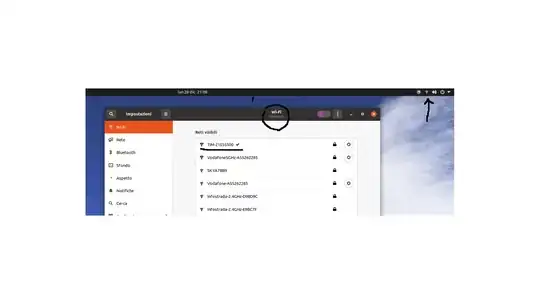
Any ideas?
    sudo lshw -class network
[sudo] password di ernesto:

  *-network
       description: Ethernet interface
       product: RTL8111/8168/8411 PCI Express Gigabit Ethernet Controller
       vendor: Realtek Semiconductor Co., Ltd.
       physical id: 0
       bus info: pci@0000:03:00.0
       logical name: enp3s0
       version: 15
       serial: 30:9c:23:67:84:9a
       capacity: 1Gbit/s
       width: 64 bits
       clock: 33MHz
       capabilities: pm msi pciexpress msix bus_master cap_list ethernet physical tp mii 10bt 10bt-fd 100bt 100bt-fd 1000bt-fd autonegotiation
       configuration: autonegotiation=on broadcast=yes driver=r8169 driverversion=5.8.0-33-generic firmware=rtl8168h-2_0.0.2 02/26/15 latency=0 link=no multicast=yes port=MII
       resources: irq:18 ioport:d000(size=256) memory:df104000-df104fff memory:df100000-df103fff
  *-network
       description: Wireless interface
       physical id: 2
       bus info: usb@2:1.4
       logical name: wlx1062eb92c6aa
       serial: 10:62:eb:92:c6:aa
       capabilities: ethernet physical wireless
       configuration: broadcast=yes driver=8814au driverversion=5.8.0-33-generic ip=192.168.1.9 multicast=yes wireless=IEEE 802.11


lsusb
Bus 002 Device 003: ID 0480:0820 Toshiba America Inc Canvio Advance Disk
Bus 002 Device 005: ID 2001:331a D-Link Corp. External USB 3.0
Bus 002 Device 004: ID 1058:0730 Western Digital Technologies, Inc. My Passport Essential (WDBACY)
Bus 002 Device 002: ID 05e3:0626 Genesys Logic, Inc. USB3.1 Hub
Bus 002 Device 001: ID 1d6b:0003 Linux Foundation 3.0 root hub
Bus 001 Device 007: ID 046d:c083 Logitech, Inc. G403 Prodigy Gaming Mouse
Bus 001 Device 009: ID 0c45:6536 Microdia
Bus 001 Device 008: ID 046d:c52f Logitech, Inc. Unifying Receiver
Bus 001 Device 006: ID 2109:2812 VIA Labs, Inc. VL812 Hub
Bus 001 Device 005: ID 046d:c313 Logitech, Inc. Internet 350 Keyboard
Bus 001 Device 003: ID 1949:000d Lab126, Inc. Android
Bus 001 Device 004: ID 1038:1250 SteelSeries ApS USB2.1 Hub
Bus 001 Device 002: ID 05e3:0610 Genesys Logic, Inc. Hub
Bus 001 Device 001: ID 1d6b:0002 Linux Foundation 2.0 root hub

rfkill list all
0: phy0: Wireless LAN
    Soft blocked: no
    Hard blocked: no

dkms status
8192cu, 1.11, 5.4.0-58-generic, x86_64: installed
8814au, 5.8.5.1, 5.8.0-33-generic, x86_64: installed (WARNING! Diff between built and installed module!)
btusb, 4.0, 5.4.0-58-generic, x86_64: installed
btusb, 4.0, 5.8.0-33-generic, x86_64: installed
nvidia, 450.80.02, 5.4.0-58-generic, x86_64: installedError! Could not locate dkms.conf file.
File: /var/lib/dkms/rtl88x2bu/5.3.1/source/dkms.conf does not exist.

nvidia, 450.80.02, 5.8.0-33-generic, x86_64: installed
rtl8812au, 5.6.4.1: added
rtl8814AU, 4.3.21: added
rtl8814au, 5.8.5.1: added

